
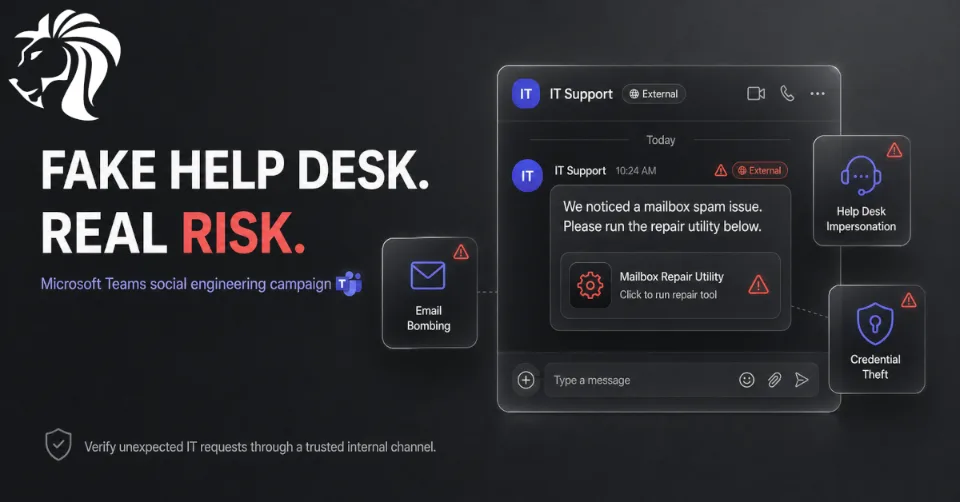
A newly documented threat activity cluster, known as UNC6692, has been observed using a highly convincing social engineering technique: impersonating IT help desk staff via Microsoft Teams.
Instead of relying only on traditional phishing emails, the attackers first create pressure by overwhelming the victim’s inbox with spam. Then, while the user is distracted and frustrated, they reach out over Microsoft Teams pretending to be IT support and offer help fixing the issue. Google’s Mandiant says UNC6692 used this approach to deploy a custom modular malware suite and gain deep access into compromised environments.
How the Attack Starts
The attack begins with email bombing.
The victim receives a flood of spam messages, creating confusion and a sense of urgency. Shortly afterward, an attacker contacts them through Microsoft Teams from an external account while pretending to be from the internal IT help desk.
This tactic works because it feels believable. The user already has a real problem — a flooded inbox — and the fake support agent appears at exactly the right moment with a solution.
According to Mandiant, the victim was asked to click a link shared through Teams to install a local patch that would supposedly stop the spam problem. Instead, the link led to a fake page and downloaded an AutoHotkey-based payload from an attacker-controlled AWS S3 bucket.
Fake “Mailbox Repair” Utility
The phishing page was designed to look like an official repair tool named “Mailbox Repair and Sync Utility.”
It included a professional-looking interface and a prominent “Health Check” button. When clicked, the page prompted the victim to enter mailbox credentials, supposedly for authentication. In reality, those credentials were harvested and uploaded to an attacker-controlled infrastructure. Mandiant also noted that the page rejected the first two password attempts to make the prompt feel more legitimate and to reduce the chance of collecting a mistyped password.
This is a strong example of modern phishing: the attack does not just ask for credentials directly. It creates a believable workflow that looks like a normal IT troubleshooting process.
The SNOW Malware Ecosystem
Once the victim interacts with the fake repair utility, UNC6692 deploys a modular malware toolkit referred to as the SNOW ecosystem.
The main components are:
SNOWBELT is a malicious Chromium-based browser extension. It is installed into Microsoft Edge and launched in headless mode, meaning it can run without visibly opening a normal browser window.
Mandiant describes SNOWBELT as a JavaScript-based backdoor that acts as the initial foothold and relays attacker commands to other components. It also uses browser extension mechanisms for persistence and supports command handling, payload downloads, screenshots, cache deletion, and WebSocket control.
SNOWGLAZE is a Python-based tunneler. Its role is to create a secure WebSocket tunnel between the victim’s internal network and the attacker’s command-and-control infrastructure.
This allows the attacker to route traffic through the compromised machine and interact with internal systems while blending into encrypted web traffic.
SNOWBASIN is a Python backdoor that runs as a local HTTP server, typically on ports 8000, 8001, or 8002. It enables remote command execution through cmd.exe or powershell.exe, screenshot capture, file staging, downloads, and self-termination.
Together, these components give the attacker persistence, remote control, tunneling, credential theft, and lateral movement capability.
Post-Compromise Activity
After gaining access, UNC6692 was observed performing actions that are commonly associated with deeper enterprise compromise.
The reported activity included:
- 🔍 scanning the local network for services such as SMB, RDP, and RPC
- 🧑💻 establishing PsExec and RDP sessions through the SNOWGLAZE tunnel
- 🔐 dumping LSASS memory to obtain credentials and hashes
- 🧬 using pass-the-hash techniques for lateral movement
- 🏢 moving toward domain controllers
- 📦 collecting sensitive data with tools such as FTK Imager
- ☁️ exfiltrating data using cloud and file-transfer services
This is not just a simple phishing campaign. It is a full intrusion chain that can move from a Teams message to internal reconnaissance, credential theft, lateral movement, and data exfiltration.
Microsoft Teams as an Attack Surface
The UNC6692 activity fits into a broader trend: attackers are increasingly abusing collaboration platforms such as Microsoft Teams to impersonate help desk staff.
Microsoft recently warned that threat actors are using cross-tenant Teams communication to pose as IT support and convince users to grant remote access through tools such as Quick Assist or similar remote support software. Once access is granted, attackers may use trusted applications, native Windows tools, WinRM, commercial remote management tools, and Rclone to move laterally and stage data for exfiltration.
The important point is that Microsoft Teams itself is not necessarily being “exploited” in the technical sense. The attackers are abusing trust, urgency, and normal business workflows.
Executives Are Being Targeted
ReliaQuest reported that this type of email bombing, plus Teams help desk impersonation, has been heavily used against executives and senior-level employees.
From March 1 to April 1, 2026, ReliaQuest observed that 77% of incidents targeted senior-level employees, up from 59% in the first two months of 2026. The campaign is fast-moving, with some chats reportedly initiated only seconds apart.
That makes sense from an attacker’s perspective. Senior staff often have broader access, sensitive communications, approval authority, and visibility into valuable business data.
Vishing and Teams Meetings Are Also Being Used
This trend is not limited to text-based Teams chats.
Cato Networks reported a separate campaign where attackers used voice phishing and Microsoft Teams meetings to impersonate help desk staff and guide victims into executing a WebSocket-based backdoor called PhantomBackdoor. The attack relied on screen sharing, staged PowerShell execution, and social engineering rather than a traditional email attachment.
This shows that collaboration tools are becoming first-class phishing channels. Attackers are no longer limited to email. They can use chat, calls, meetings, screen sharing, and remote assistance workflows to create a more convincing attack.
How Organizations Can Defend Themselves
Organizations should treat unsolicited IT support contact through Microsoft Teams as suspicious, especially when it comes from an external tenant or asks the user to install tools, run commands, open remote support sessions, or enter credentials.
Recommended actions include:
- ✅ restrict external Teams communication where possible
- ✅ clearly label and train users on external Teams contacts
- ✅ create a help desk verification process, such as an internal code phrase
- ✅ block or tightly control Quick Assist and third-party RMM tools
- ✅ monitor for unexpected AutoHotkey execution
- ✅ detect headless Edge or suspicious
--load-extensionusage - ✅ alert on unusual local HTTP servers on ports 8000–8002
- ✅ monitor suspicious PowerShell,
cmd.exe, PsExec, WinRM, RDP, and LSASS access - ✅ review use of Rclone, FTK Imager, and other data-transfer tools
- ✅ enforce MFA and Conditional Access for sensitive systems
Microsoft specifically recommends layered defenses, including user education, Safe Links, Zero-hour Auto Purge, Attack Surface Reduction rules, network protection, Conditional Access, MFA, and restricting administrative protocols such as WinRM to approved management systems.
User Awareness Message
A simple internal warning for employees could be:
🚨 IT will never unexpectedly contact you from an external Teams account and ask you to install a mailbox repair tool, run scripts, share your screen, enter credentials, or start a remote support session without prior verification.
This kind of message should be repeated often, especially for executives, finance teams, HR, IT administrators, and anyone with access to sensitive systems.
Final Thoughts
UNC6692 shows how effective social engineering has become when attackers combine timing, trust, and legitimate enterprise tools.
The attack does not begin with a suspicious attachment. It begins with a problem the user can see: a flooded inbox. Then comes a helpful-looking Teams message. Then a fake repair utility. Then malware, tunneling, credentials, lateral movement, and data theft.
The key lesson is clear:
💬 Collaboration tools are now part of the attack surface.
Microsoft Teams, remote support tools, browser extensions, cloud storage, and built-in Windows administration features are all useful for real business operations — but attackers know that too.
Organizations need to defend not only against malicious files, but also against malicious conversations.


