
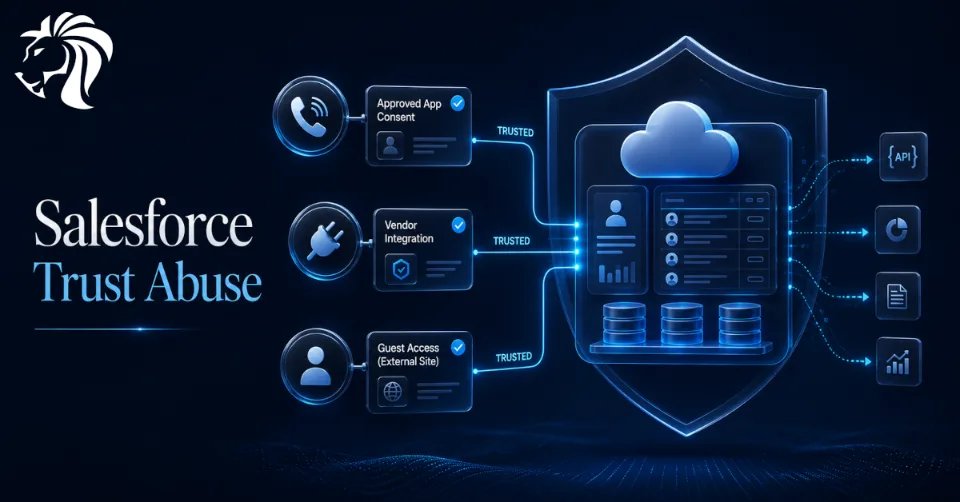
Attackers whose methods overlap with the data-extortion group ShinyHunters have spent the past year targeting corporate Salesforce environments without exploiting a vulnerability in Salesforce itself.
Instead, the campaigns abused something many organizations already rely on every day: trusted OAuth connections, connected apps, third-party integrations, and misconfigured guest access.
Microsoft says the activity ran from mid-2025 into mid-2026 and affected organizations across industries including retail, education, and manufacturing.
The key issue is not a broken Salesforce platform. It is the trust layer around Salesforce.
Why This Is Hard to Detect
Many security programs are built around human logins.
They monitor sign-ins, failed MFA attempts, suspicious IP addresses, impossible travel, and password-based attacks.
But in these Salesforce campaigns, the access often came through something that already looked legitimate:
- a real user approving an OAuth app
- a trusted vendor integration
- an existing service connection
- a guest role that was misconfigured
That means traditional authentication logs may show very little.
The attacker does not need to break in using malware or stolen passwords if they can get an approved app or trusted integration to make API calls on their behalf.
The important signal is not only who logged in.
It is what the connected app did after access was granted.
Microsoft Identified Three Main Intrusion Paths
Microsoft grouped the activity into three techniques:
- vishing calls that trick employees into approving malicious connected apps
- stolen OAuth tokens from compromised software vendors
- misconfigured Salesforce guest access through Experience Cloud sites
Each technique abuses trust in a different way.
Together, they show how Salesforce risk increasingly lives around the platform: in integrations, vendors, permissions, and exposed business workflows.
1️⃣ Path One: Vishing and Malicious OAuth Consent
The first technique relied on voice phishing.
Attackers called employees while pretending to be IT support and walked them through Salesforce’s OAuth consent screen.
The goal was to get the victim to approve an attacker-controlled connected app disguised as Salesforce’s own Data Loader tool.
Once the user approved the app, the attackers could make API calls as that user.
That access could allow them to enumerate Salesforce data, maintain access to CRM records, and search for credentials or secrets that might unlock other SaaS environments.
No password replay was required.
No malware was needed.
The attack succeeded because a real user approved a malicious app.
This makes user training and help-desk process especially important. When attackers use a phone call to guide someone through an authorization flow, ordinary identity checks may not be enough.
2️⃣ Path Two: Stolen OAuth Tokens From Trusted Vendors
The second technique bypassed the employee completely.
Instead of tricking a user, attackers compromised a software vendor whose application already had OAuth access to customer Salesforce environments.
They then stole OAuth tokens or connection secrets and used them to query and export data from downstream Salesforce instances.
This is especially dangerous because the traffic comes from an approved integration.
To many systems, it looks like normal automation.
Microsoft points to incidents involving vendors such as Salesloft Drift, Gainsight, and Klue.
In the Salesloft Drift case, attackers reportedly used stolen OAuth and refresh tokens linked to the Drift AI chat integration to access Salesforce customer environments. The operators were interested in secrets and credentials inside Salesforce data, including support cases and other objects that might contain AWS keys, Snowflake tokens, passwords, or similar sensitive material.
The Gainsight incident followed a similar pattern against another trusted vendor ecosystem.
The Klue compromise involved a long-unused but still-active legacy credential from a test integration. Attackers used it to access Klue infrastructure, push code that harvested customer OAuth tokens, and then reach Salesforce and Gong data belonging to Klue customers.
The lesson is clear: old credentials and vendor integrations can remain dangerous long after teams forget they exist.
3️⃣ Path Three: Misconfigured Guest Access
The third path did not require credentials at all.
Microsoft observed suspicious activity against Salesforce Aura endpoints used by Experience Cloud sites.
Where guest-user permissions were misconfigured, attackers could access functionality without authenticating.
They used the GraphQL Aura controller and cursor-based pagination to pull records beyond normal query limits.
This was not an exploit.
It was permission abuse.
The guest role had access to more data than it should have, and attackers used that access at scale.
For defenders, this reinforces a simple point: public-facing Salesforce sites must be reviewed carefully. Guest users should have the absolute minimum permissions required, and every exposed object should be treated as Internet-facing.
What Microsoft and Salesforce Added
Microsoft worked with Salesforce to improve detection and governance for this type of activity.
The focus is on what happens after access is granted.
For organizations using Salesforce Shield Event Monitoring, the upgraded Salesforce connector in Defender for Cloud Apps can provide more context around connected app activity, OAuth scopes, session details, and API behavior.
That matters because defenders need to know:
- which connected app made the call
- what OAuth scopes the app has
- how much data it queried
- whether the behavior is normal
- whether the app is still actively used
- whether the app is over-permissioned
Microsoft also added governance features to surface highly privileged apps, unused apps that still retain permissions, and app-level risk scoring.
The goal is to find risky integrations before attackers do.
Why OAuth Is Now a Major Attack Surface
OAuth is essential to modern SaaS environments.
It allows apps to connect, automate workflows, and access data without repeatedly asking users for passwords.
But that convenience creates risk.
OAuth apps can hold powerful permissions. Refresh tokens can keep access alive. Service integrations may operate quietly in the background for years. Vendors may have access across hundreds of customer environments.
If those connections are not inventoried, monitored, and governed, they become an ideal path for attackers.
The problem is not OAuth itself.
The problem is uncontrolled trust.
What Defenders Should Do
Organizations using Salesforce should treat connected apps and integrations as first-class security assets.
Important actions include:
- inventory all Salesforce connected apps
- remove unused integrations
- review OAuth scopes for least privilege
- monitor API activity by connected app
- investigate unusual data exports
- revoke and rotate tokens quickly after vendor incidents
- review guest-user permissions on Experience Cloud sites
- restrict access to Aura endpoints where possible
- monitor Salesforce event logs
- train employees not to approve OAuth apps during unsolicited support calls
- require help-desk verification through known-good channels
Security teams should also pay attention to old test credentials, abandoned integrations, and vendor apps that still have live permissions.
Forgotten trust is still trust.
Attackers can use it.
Final Thoughts
These Salesforce campaigns show a major shift in SaaS intrusion tactics.
Attackers do not always need to exploit a platform vulnerability. They can abuse the trust organizations have already granted to users, apps, vendors, and guest roles.
That is what makes the activity difficult to detect.
The login may look normal. The integration may be approved. The API calls may come from a trusted app.
But the behavior after access tells the real story.
For Salesforce defenders, the priority is clear: monitor connected apps, govern OAuth access, reduce vendor and guest-user exposure, and remove forgotten credentials before attackers find them.
Modern SaaS security is no longer only about protecting user accounts.
It is about controlling every trusted path into the data.


