
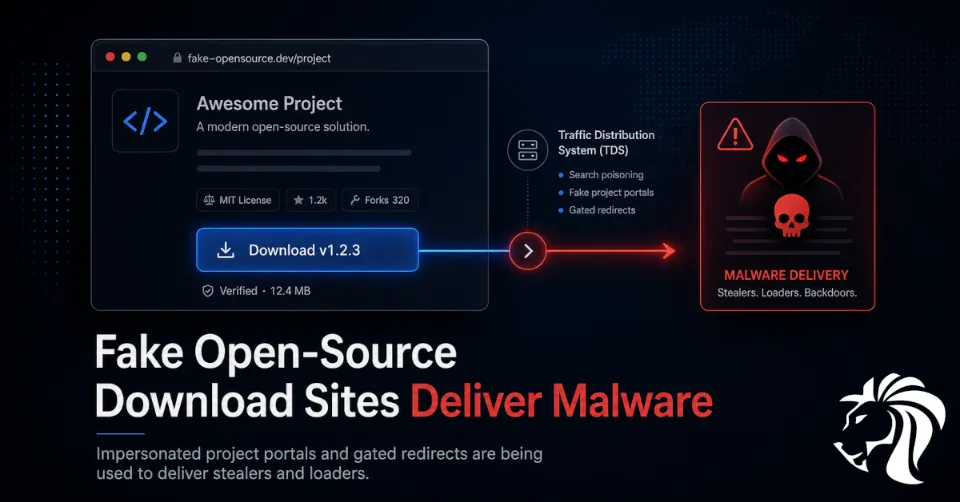
Cybersecurity researchers have uncovered a large-scale malware distribution campaign that impersonates trusted open-source and freeware projects to lure users into downloading malicious payloads.
The campaign uses well-designed fake project websites that appear legitimate at first glance. Some even reference real upstream resources and display genuine-looking download links. However, the deception begins when the user interacts with the page.
Instead of directly downloading the expected software, the site loads a JavaScript staging layer hosted on CloudFront. This script intercepts clicks on download buttons and redirects selected users through a Traffic Distribution System, or TDS, which decides whether to deliver malware, benign software, browser extensions, or nothing suspicious at all.
The operation has been linked to malware families including Remus Stealer, AnimateClipper, and a previously unknown loader framework called SessionGate.
How the Campaign Works
The attackers create fake websites that mimic legitimate open-source and freeware project portals.
Some of the impersonated tools include trusted reverse-engineering and security utilities such as:
- Ghidra
- dnSpy
- SpiderFoot
These are tools commonly searched for by developers, malware analysts, security researchers, and technical users. That makes the campaign especially dangerous because the target audience may work with sensitive code, credentials, systems, and security tooling.
The fake sites are designed to rank well in search engines. Users looking for legitimate tools may find these malicious pages near the top of Google search results, sometimes even ahead of the real project website.
This is a classic case of search engine poisoning, but with a more sophisticated delivery layer behind it.
The Role of the Traffic Distribution System
A Traffic Distribution System is used to route users based on rules set by the operator.
In this campaign, the TDS applies strict gating before deciding what to serve.
The checks include:
- first-visit state
- required click confirmation
- anti-bot logic
- anti-analysis logic
- VPN and datacenter filtering
- frequency capping
- repeated-visit behavior
This means not every visitor receives malware.
A real user visiting from a residential IP address for the first time may be routed to a malicious payload. A security researcher, sandbox, VPN user, or repeated visitor may instead receive harmless software or a browser extension.
This makes the campaign harder to analyze and harder to block. It also helps the attackers keep their infrastructure alive longer by reducing obvious signs of malicious behavior.
Fake Sites That Look Legitimate
One of the most deceptive aspects of the campaign is that the fake websites often preserve links to legitimate upstream resources.
For example, hovering over a download button may show a real URL where the tool can be downloaded. This gives the site a surface-level appearance of legitimacy.
However, when the user actually clicks the button, JavaScript intercepts the click and redirects the user into the TDS chain.
This tactic is effective because many users perform only quick checks:
- Does the website look professional?
- Is the tool name correct?
- Does the download link look legitimate?
- Are there GitHub links?
- Is the page ranking high on Google?
The campaign abuses all of these trust signals.
From Traffic Monetization to Malware Delivery
Researchers believe the operation may have started as a traffic acquisition and monetization scheme.
Fake project pages were created to exploit the popularity of legitimate open-source tools and attract search traffic. Early versions of the campaign appeared focused on visibility, advertising, and routing users to third-party sites.
However, Check Point’s latest findings show that the infrastructure later evolved into malware distribution.
By January 2026, TDS scripts had been embedded into these fake portals, and selected users were being routed to malware delivery infrastructure.
This shows how gray-area traffic monetization systems can become part of a malware distribution chain. The same system that sends users to ads or browser extensions can also send selected victims to stealers, clippers, or loaders.
Malware Delivered Through the Campaign
The campaign has been associated with several payloads.
SessionGate
SessionGate is a previously unknown multi-stage loader framework.
It is heavily obfuscated and includes anti-analysis mechanisms designed to make sandboxing and reverse engineering difficult. Its delivery process can pivot to a benign installer experience when the environment appears suspicious.
The final SessionGate DLL communicates with an external server, retrieves encrypted configuration data, extracts a download URL, and silently executes the next-stage malware through cmd.exe.
This multi-stage structure makes payload retrieval more difficult for analysts because the final malware is only delivered after the full redirect and validation chain completes.
Remus Stealer
Remus Stealer is a new information stealer offered under a malware-as-a-service model.
It can steal data from more than 20 browsers and hundreds of browser extensions and applications.
Targets include:
- browser credentials
- cryptocurrency wallets
- password managers
- two-factor authentication tools
- session data
- application secrets
Researchers believe Remus may be a variant of Lumma Stealer.
For users downloading security or developer tools, this is especially dangerous because infected machines may contain credentials for GitHub, cloud platforms, VPNs, package registries, and internal systems.
AnimateClipper
AnimateClipper is a cryptocurrency clipper.
Clipper malware monitors the clipboard and replaces copied wallet addresses with attacker-controlled addresses. If a victim copies a cryptocurrency wallet address during a transaction, the malware can silently swap it before the payment is sent.
AnimateClipper reportedly supports address substitution across more than 20 blockchain ecosystems and is delivered using a ClickFix-style lure.
Why Security Tools Are Being Impersonated
The campaign’s use of security and reverse-engineering tools as lures is notable.
Users searching for tools like Ghidra, dnSpy, or SpiderFoot are often:
- developers
- malware analysts
- penetration testers
- security researchers
- IT administrators
- incident responders
- students learning security tooling
These users may have access to sensitive environments and valuable credentials.
Compromising such users can give attackers access to:
- source code
- research systems
- malware analysis environments
- corporate credentials
- cloud accounts
- security tooling
- internal networks
- client data
- cryptocurrency wallets
This makes the campaign more targeted than generic fake software downloads.
❓ Why the Campaign Is Hard to Detect
Several factors make this operation difficult to analyze and block.
First, the entry pages look legitimate and often include real references.
Second, the TDS does not serve malware to every visitor.
Third, the redirect logic changes based on IP address, visit history, VPN usage, and environment signals.
Fourth, repeated visits from the same address may return benign software, making analysts believe the site is harmless.
Fifth, payloads may be unique per client and only delivered after the full redirection path is completed.
This combination creates a highly selective malware delivery system.
Global Impact and Telemetry
VirusTotal telemetry has shown approximately 2,000 to 3,500 submissions linked to the SessionGate family.
Most submissions reportedly came from:
- Turkey
- Poland
- Brazil
- Germany
- France
- Russia
- United Kingdom
This suggests the campaign has reached users across multiple regions and may be tied to broad search traffic rather than a single geographic target.
What Users Should Do
Users should be careful when downloading open-source tools, especially security, development, and reverse-engineering utilities.
Recommended actions include:
- download tools only from official project websites or verified GitHub repositories
- avoid clicking sponsored or unfamiliar search results
- check the domain carefully before downloading
- verify release hashes or signatures where available
- avoid downloading software from lookalike project portals
- be suspicious if a download redirects through multiple domains
- avoid running installers from ZIP files without checking the source
- use browser protection and endpoint security tools
- scan downloaded files before execution
- treat unexpected browser extension prompts as suspicious
For security tools, it is best to bookmark official project pages instead of searching for them each time.
What Organizations Should Do
Organizations should protect users from fake software portals and TDS-based malware delivery.
Recommended controls include:
- block known malicious domains and TDS infrastructure
- monitor DNS requests to newly registered lookalike domains
- alert on software downloads from suspicious project clones
- use secure web gateways with file inspection
- restrict execution from download folders
- monitor for ClickFix-style lures
- detect suspicious
cmd.exeexecution from installers - inspect outbound traffic to CloudFront-hosted staging scripts where context is suspicious
- monitor for browser credential theft behavior
- deploy endpoint detection rules for stealer and clipper activity
- use application allowlisting for high-risk environments
- educate developers and analysts about fake tool portals
Security teams should also review whether employees commonly download tools directly from search engines and provide approved internal sources where possible.
Lessons for Open-Source Projects
Open-source projects should be aware that their names, branding, and popularity may be abused by malicious SEO campaigns.
Project maintainers can help users by:
- maintaining a clear official download page
- publishing checksums and signatures
- documenting official domains
- warning users about fake download sites
- monitoring lookalike domains
- reporting impersonation sites
- improving search visibility for legitimate pages
- using verified publisher profiles where applicable
The easier it is for users to identify the real project, the harder it is for attackers to exploit confusion.
Final Thoughts
This campaign shows how fake open-source project websites, search engine poisoning, and gated TDS infrastructure can combine into an effective malware delivery operation.
The fake pages look legitimate. The download buttons appear trustworthy. The visible links may even point to real resources. But the actual click is intercepted and routed through a selective distribution system that decides whether the victim receives malware.
The use of payloads such as Remus Stealer, AnimateClipper, and SessionGate shows that the threat is not limited to unwanted ads or browser extensions. Selected users may face credential theft, cryptocurrency theft, and multi-stage malware infection.
The key lesson is simple: search result ranking is not proof of trust.
Users should download tools only from verified sources, and organizations should treat fake open-source portals as part of the modern software supply chain threat landscape.


