
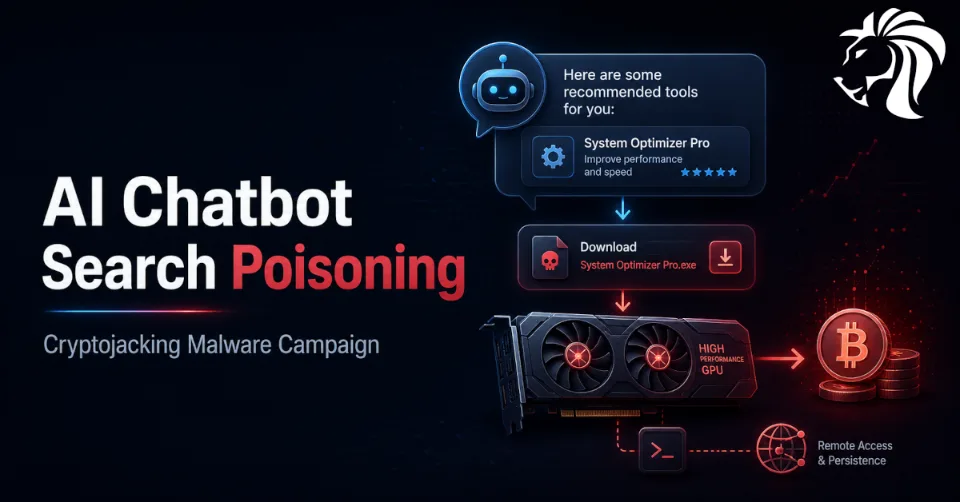
⚠️ Microsoft has warned about an active cryptojacking campaign that uses a new and worrying delivery technique: malicious software recommendations surfaced through artificial intelligence chatbot interactions.
The campaign impersonates legitimate system utilities and hardware-monitoring tools, then tricks users into downloading malware from attacker-controlled websites. While the immediate goal is cryptocurrency mining, Microsoft says the attackers also establish persistent remote access, creating the potential for follow-on activity such as data theft, lateral movement, or ransomware.
This campaign shows how threat actors are adapting social engineering to modern user behavior. As more people use AI chatbots to search for software recommendations, attackers are beginning to treat AI-generated answers as a new distribution channel.
From SEO Poisoning to AI Search Poisoning
For years, attackers have used search engine optimization poisoning to push malicious websites higher in search results. Users searching for legitimate software could be directed to fake download pages that looked convincing but delivered malware.
Microsoft’s latest research suggests that this tactic is evolving.
In recent activity observed in April 2026, users were reportedly directed to malicious sites not only through conventional search engine results, but also through interactions with large language model-based tools. In some cases, users asking AI chatbots for software download recommendations were shown links to attacker-controlled domains inside generated responses.
This represents an important shift.
AI chatbots are increasingly used as search assistants. Users may trust the answer because it appears conversational, helpful, and context-aware. If attackers can influence which sites appear in those answers, they gain another path to reach victims.
Impersonating Trusted System Utilities
The campaign impersonates well-known system utilities and software commonly used by technically minded users, including:
- CrystalDiskInfo
- HWMonitor
- Display Driver Uninstaller
- FurMark
- K-Lite Codec Pack
- PDFgear
This selection appears intentional.
Several of these tools are popular among users with gaming PCs, workstation-class systems, or high-performance graphics cards. Microsoft assessed that the attackers may be trying to compromise systems with higher GPU mining value instead of infecting random machines at scale.
In other words, the campaign is not just looking for any endpoint. It is looking for profitable endpoints.
A machine with a powerful GPU can generate more value for cryptojacking operations, making it a more attractive target.
How the Attack Chain Works
The attack begins when users search for legitimate utilities or ask AI tools for download recommendations.
They may then be directed to fake download sites controlled by the attackers. These sites contain prominent download buttons that retrieve ZIP archives from campaign-specific subdomains hosted under gleeze[.]com, using infrastructure associated with Dynu, a dynamic DNS provider frequently abused by threat actors.
Microsoft identified more than 150 malicious domains serving these fake tools.
The downloaded ZIP archive contains two important components:
- A legitimate executable
- A malicious DLL named
autorun.dll
When the user launches the legitimate executable, the malicious DLL is sideloaded. This DLL then installs another malicious component named vcredist_x64.dll using msiexec.exe.
That component is actually a packaged installer for ScreenConnect.
ScreenConnect Used for Persistent Remote Access
ScreenConnect is a legitimate remote access tool. Like many remote management products, it can be abused by attackers when deployed without authorization.
In this campaign, the malware installs ScreenConnect so the compromised machine can repeatedly connect to an attacker-controlled server at:
193.42.11[.]108
This gives the attackers persistent remote access to the infected host.
That detail is important because the campaign is not limited to cryptomining. Once remote access exists, the attacker may be able to perform additional actions later, including:
- data theft
- credential harvesting
- internal reconnaissance
- lateral movement
- malware deployment
- ransomware preparation
Cryptojacking may be the first monetization step, but persistent access creates broader risk.
SimpleRunPE: Persistence, Evasion, and Miner Deployment
After ScreenConnect is installed, the attacker uses it to deliver an executable called SimpleRunPE.exe.
This binary performs several key functions:
- establishes persistence using Registry Run keys
- creates scheduled tasks
- configures Microsoft Defender exclusions
- performs anti-analysis checks
- uses process hollowing
- launches mining code under a trusted Microsoft-signed binary
Process hollowing is a technique where malicious code is injected into a legitimate process. This can help malware hide under the appearance of a trusted executable and evade some security tools.
In some cases, instead of using ScreenConnect file transfer, the attackers used a PowerShell script to download the binary from a remote drive. The file was saved locally as vlc.exe, likely to make it look less suspicious, then a scheduled task was created to run it.
The script then deleted itself to reduce evidence.
Runtime Miner Selection
Once active, the hollowed binary communicates with the attacker’s server and sends detailed host information. It then downloads the appropriate miner archive at runtime.
The malware supports three mining programs:
- gminer
- lolMiner
- SRBMiner-MULTI
This runtime selection allows attackers to adapt the payload to the victim system and maximize mining efficiency.
The malware also recreates persistence artifacts if they are removed and reconfigures Defender exclusions to maintain access.
This makes cleanup more difficult if defenders only remove one component without fully investigating the infection chain.
Anti-Analysis and Stealth Behavior
The malware actively watches for tools that users or defenders might use to inspect running processes.
If it detects certain process-monitoring tools, it immediately terminates the miner.
The monitored tools include:
taskmgr.exeprocesshacker.exeprocesshacker2.exeprocexp.exeprocexp64.exesysteminformer.exe
This behavior is designed to reduce suspicion. If a user opens Task Manager or Process Explorer to investigate why their GPU or system is under heavy load, the mining process may stop temporarily.
That can make the machine appear normal during manual inspection.
Why This Campaign Matters
Cryptojacking is sometimes treated as a lower-priority threat because it does not immediately encrypt files or steal money directly from the victim.
That view is too narrow.
This campaign includes persistent remote access, Defender exclusions, process hollowing, scheduled tasks, and remote administration tooling. These are not harmless mining behaviors. They are signs of a more capable intrusion chain.
A compromised endpoint could become:
- a mining node
- a remote access foothold
- a staging point for future malware
- a source of stolen credentials
- a pivot point into a larger network
- a candidate for ransomware deployment
For home users, the impact may be degraded performance, higher electricity usage, hardware stress, and privacy risk. For organizations, the impact can be much more serious.
AI Recommendations as a New Attack Surface
The most important strategic lesson is the abuse of AI chatbot recommendations.
As users increasingly rely on AI tools for software suggestions, attackers will try to influence what those tools recommend. This may include poisoning search results, creating fake software pages, manipulating web content, and building domains that appear credible to AI retrieval systems.
This creates a new kind of trust problem.
Users may ask an AI chatbot, “Where can I download HWMonitor?” and assume the answer is safer than a random search result. But if the chatbot surfaces a malicious link, the user may be even more likely to trust it.
Security awareness training now needs to include AI-assisted search behavior.
The safest download source is still the official vendor website or a trusted software distribution channel, not an AI-generated link.
Trusted Tools and Third-Party Abuse
Microsoft’s report also connects this campaign to a broader theme: attackers increasingly abuse trusted tools, trusted relationships, and legitimate infrastructure.
The same report discusses other incidents where attackers compromised internet-facing edge appliances, abused privileged accounts, pivoted through internal Linux systems, targeted Confluence servers, and used trusted operational relationships or third-party IT service providers to maintain access.
The pattern is clear.
Threat actors prefer methods that look legitimate on the surface:
- remote management tools
- approved vendor software
- trusted update paths
- cloud platforms
- service provider access
- legitimate authentication processes
- signed binaries
- common infrastructure services
This makes “trusted” tooling dangerous when visibility and validation are weak.
Defensive Recommendations for Users
Individual users should be cautious when downloading system utilities, especially tools related to GPUs, drivers, disks, codecs, or performance testing.
Recommended steps include:
- download software only from official vendor websites
- avoid download links provided by unknown mirrors
- be cautious with AI-generated software recommendations
- verify domain names carefully
- avoid running executables from ZIP archives without checking the source
- keep Microsoft Defender or another reputable security product enabled
- monitor unexpected GPU usage
- investigate unknown ScreenConnect installations
- remove suspicious scheduled tasks
- check for unknown Defender exclusions
If a system suddenly becomes hot, noisy, slow, or shows unusual GPU usage, cryptomining malware should be considered.
Defensive Recommendations for Organizations
Organizations should treat this campaign as more than a consumer cryptojacking issue.
Recommended actions include:
- block known malicious domains and infrastructure
- monitor outbound connections to suspicious dynamic DNS domains
- alert on unauthorized ScreenConnect installations
- inventory approved remote management tools
- block unauthorized remote access software
- monitor for Defender exclusion changes
- alert on unexpected
msiexec.exeactivity installing remote tools - detect DLL sideloading from user download directories
- monitor PowerShell downloads from remote drives
- alert on scheduled tasks created by non-admin workflows
- monitor abnormal GPU usage on workstations
- restrict software installation permissions
- use application control for high-risk environments
Security teams should also review whether users are allowed to download and install utilities from the web without approval.
What to Monitor
Useful detection points include:
- ZIP downloads from unfamiliar software sites
- execution of legitimate utilities from suspicious paths
- sideloading of
autorun.dll - installation of
vcredist_x64.dll - unexpected ScreenConnect clients
- outbound connections to
193.42.11[.]108 - creation of Registry Run keys
- suspicious scheduled tasks
- Defender exclusion changes
- process hollowing behavior
- mining software downloads
- execution of files named
vlc.exefrom unusual directories - PowerShell scripts that download binaries and delete themselves
Organizations should correlate endpoint telemetry, DNS logs, proxy logs, and remote access software inventories.
Final Thoughts
Microsoft’s warning shows how cybercriminals are adapting to new search habits.
The old model was simple: poison search results and wait for users to click. The new model adds another layer: influence AI chatbot recommendations so that malicious download sites appear in generated answers.
Combined with software impersonation, DLL sideloading, ScreenConnect abuse, persistence, Defender exclusions, and GPU-focused cryptomining, this campaign is more sophisticated than typical mining malware.
The takeaway is simple: AI-generated recommendations aren't always safe.
Users and organizations should download software only from official sources, monitor unauthorized remote access tools, and treat unexpected mining activity as a potential sign of deeper compromise.


